Showing posts with label Asus. Show all posts

Thursday, May 29, 2008

Splashtop Linux variant to power up Asus notebooks


If you’re one of those PC users who always find yourself doing other things while waiting for your machines to completely boot up, either you’d be glad to hear about Splashtop or feel sad since you might end up not doing those other things anymore. But that is if you are using an Asus notebook as these machines will be getting the Splashtop Linux OS treatment.

If you would recall Splashtop has been pre-installed on some Asus motherboards not so long ago, and soon enough it will be powering some Asus notebook as a full-blown OS. If you think that the Splastop is just your ordinary Linux variant, think again. Well, that’s because Splashtop offers up a unique PC boot up experience. Soon, you can instantly fire up some application even if your machine has not completed its boot up sequence. What makes this possible is the fact that Splashtop will run out of your machine’s RAM. Hence, saving you some precious battery time.

In a nutshell, Splashtop offers a fast, secure and eco-friendly way of using your Asus machines. For those who are not using Asus notebook this might be a good reason to score one as soon as the Splashtop gets into these machines.

Sunday, May 11, 2008

Asus Eee PC 4G Surf Revealed

Just a few months ago Asus rocked the ultraportable market with the release of the EEE PC 701. At the beyond-reasonable price of $399, the 701 came armed with a versatile Linux operating system and tons of handy applications. Asus Eee PC 4G - ZerOne Magazine

Now Asus has released a new version of the tiny wonder. The EEE PC Surf 4G ditches the glitchy webcam of its predecessor and simultaneously sheds a few bucks as well. For $349, the coffee house-bound user gets a two-pound portable with a seven-inch display and 4GB solid state drive. We loved the 701, so we're pleased to say the 4G doesn't land too far from the tree.

Saturday, May 3, 2008

Asus P320 Windows Mobile PDA Phone - Page 2

Of course, the P320's Bluetooth connectivity means you needn't completely forget the idea of using the phone for serious work. One of Windows Mobile Professional's biggest selling points is that you can create, edit and save Microsoft Office documents, and with the right add-ons, this phone can still be a powerful tool - though you may get a crick in your neck peering at that tiny screen.

Asus P320 Windows Mobile PDA Phone - ZerOne Magazine

Elsewhere the P320 is not the most powerful device, however. It's a quad-band GSM phone, so it'll work pretty much anywhere you can get a mobile phone signal, but there's no HSDPA - just GPRS. It has just a 2-megapixel camera with no flash or self-portrait mirror too. And though Windows Mobile 6.1 helps it a little, the core components aren't the quickest: the OMAP850 200MHz processor chugs occasionally when launching applications, and the 64MB of RAM isn't the most generous in the world.

It's not as bad as it could be, though; help is at hand in the shape of a useful extra application called Auto Cleaner. This allows you to force Windows to remove applications from the memory when you press the X in the top right of the Window, instead of keeping everything minimised and slowing the phone to a crawl. Usefully, you can set some apps up to be exempted from this regime, so you can keep Windows Media player running, at all times if you want.


There are other notable features, too, some added by Asus, some courtesy of Windows Mobile 6.1. The latter is responsible for the Getting Started Centre, which provides handy shortcuts to important setup items such as email, date and time, and Bluetooth headset. There's threaded SMS, again; a new WMP 6.1 feature . Don't expect anything swanky like the iPhone's speech bubbles - all Windows Mobile does is group messages to and from specific recipients, a bit like Google Mail - but it is a useful addition. Google Calendar sync has also been preinstalled, as has Voice Commander (speech dialling and phone control software), and some handy additions to the device's phone functionality in the shape of a call filter and profile setup and selection tool.


Verdict


It all goes together to make a well-rounded smartphone that's just about the most pocketable Windows Mobile PDA phone you're likely to come across. Unfortunately, though, there's no getting around the fact that the P320's small screen makes using Windows Mobile Professional even more fiddly to use than it normally is. But if you don't mind getting the stylus out occasionally and want the push email and office document features of a Windows Mobile device without the bulk, it's a very solid option. And the inclusion of a GPS receiver in a device this small is just the icing on the cake.

Asus P320 Windows Mobile PDA Phone - Page 1

Design 7/10
Features 7/10
Performance 7/10
Value 7/10
Overall 7/10

While the rest of the mobile phone industry has been producing ever slimmer and sexier handsets, so-called 'smart' phones have struggled to keep up. Hampered by the need for usability (yes, I know it sounds silly), practicality and power - and the fact that Windows Mobile doesn't work that well on small screens - most smartphones have traditionally tended to be on the pocket-stretching side.


That is beginning to change, though. The Palm Centro recently demonstrated that you can fit a usable QWERTY keypad on a device that doesn't require a belt clip to carry it around, and I liked the Asus M930, a beautifully-designed clamshell phone based on Windows Mobile Standard, again with a full QWERTY keyboard, but still small and sexy.


But nothing I've yet seen quite beats Asus' latest, and most exciting, PDA-style handset for sheer pocketability. The Asus P320 measures a mere 100 x 55mm and is 13.4mm slim. It weighs just 105 grams, too, which makes it the smallest, lightest Windows Mobile Professional device I've ever come across. It's more compact even than the HTC Touch and Glofish X600 - even my small hands look gorilla-like in the presence of this dainty device. Amazingly, given such diminutive dimensions, the P320 also includes a GPS receiver, so you can add full in-car sat-nav via the microSD slot on the side if you want. There's also a Wi-Fi adaptor packed in somehow


Asus P320 Windows Mobile PDA Phone - ZerOne Magazine

Of course the tiny dimensions do have their drawbacks: you'll not be wanting to type out any seriously long emails using this phone - there's no sliding keyboard, no hardware number pad, and not even any enhancement to the useless on-screen Windows Mobile keyboard. And Windows Mobile's small check boxes and skinny scrollbars are even less usable on a 240 x 320 screen that measures just 2.65in diagonally.


But Asus has made an effort here to mitigate such restrictions. As well as including the latest version of Windows Mobile Professional - version 6.1 - the P320 is equipped with Asus' own Today Screen enhancements which, like the HTC version and SPB's excellent Mobile Shell software, include weather information, plus quick access to other commonly used functions. In this case, you get an attractive snapshot of calls missed, voice messages left, and email plus a scrolling ticker of either recent emails, text messages or RSS feed news stories - the latter supplied via the bundled Newstation RSS tool. Plus there's the obligatory over-sized digital clock and alarm display. Asus has also included its own finger-friendly launcher software that allows you to initiate, if not operate, many of the P320's applications and settings without recourse to the stylus, which is tucked away in a slot at the top left of the chassis.


The phone's physical controls work well. Under the screen on the front there's a clickable five-way thumb control - nothing fancy, but it does the job - and this is surrounded by a familiar-looking array of Windows Mobile smartphone buttons. Here you get Start, ok, pick-up and hang-up keys, plus a couple of hardware soft buttons atop the cluster. I liked the fact that the P320 has a proper lock and unlock switch on the side: it's much more effective and reliable than simply relying on the power button, which can easily be pressed by accident, or an on-screen method to lock the phone, as is the case with most other Windows Mobile devices

Monday, April 28, 2008

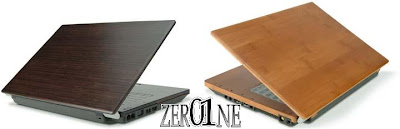
Asus Launching Bamboo Notebooks In June

What's better than an 11in or 12in notebook? How about an 11in or 12in notebook encased in bamboo? Well, the Ecobook which Asus was touting last year for a Q1 release is just such a machine. Although that release date has now slipped back to June, according to DigiTimes' sources, it is still just as bamboo-encased as ever before.

Asus Bamboo Notebooks - ZerOne Magazine

Called the U6 (12in) and S6 (11in), the systems specs aren't mentioned but given the eco-friendly leanings it seems safe to assume they won't be powerhouses. On the flip side of that, and if the prototypes shown off last year are a good indicator, features such as an LED which changed between green and red depending on energy usage - guilting users into acting greener presumably.


The manufacturing aims to be as environmentally affable as possibly too, foregoing paint sprays and electroplating. Internally no solvents or otherwise hazardous materials have been used.
All the plastics that are used are of the recyclable type, assuming the bamboo case doesn't biodegrade when you spill coffee on it (fair trade of course) first. As well as these notebooks, Asus also showed of desktop PCs in a similar vein, but apparently has no plans to actually ship any such product.


Price wise the U6 and S6 are expected to cost from NT$50,000 (that's New Taiwan Dollars, or £830-odd in real money) which seems pretty reasonable. Hopefully the UK will get a taste of the bamboo action - although not in the panda sense.

ZerOne Magazine ZerOne Magazine